
The Starter Pro theme is a 3rd party Genesis Framework Theme created for multiple niches. It’s considered a starter theme but this theme, in fact, has different child themes to choose from. It’s an amazing business starter theme for any type of blogger. You have plenty of choices to start a few different niche blogs with only 1 theme and 1 price. keep in mind each theme is customizable, so explore WPOutcast for some tutorials on how to customize this theme on the Genesis Framework.
Lot’s of features are already made available to you. Starter pro supports the Beaver Builder plugin that allows you to easily build responsive WordPress websites without touching a line of code.
Think of what you can do with these amazing child themes. My favorite one is the lawyer one. Here is a tip for revenue with the lawyer one, use Google AdSense but do not add too many advertising blocks as it will take the full attention away from the content. This is a high paying niche as AdWords Advertisers are bidding high to get their firm ads seen more often.
Let’s get to the Starter Pro features and be sure to check out all the demo versions listed.
Starter Pro Features
- HTML5
- Accessibility
- 1-Click Update (From Dashboard)
- Supporting Multisite Network
- Enable/Disable Responsive Effect
- Extra Theme Settings
- Color Assets in Customizer
- Import/Export Theme Settings
- Full Width / Boxed Layout
- Unregistered Genesis Layouts
- Unregistered Primary/Secondary Sidebar
- Inline Logo
- Show Site Title & Tagline with Logo
- Sticky Site Header
- Sticky Primary/Secondary Menu
- Fade In/Out Sticky menu
- Move Primary/Secondary Navigation
- Set Post/Page Specific Menu
- Setup Fallback Image
- Disable Blog Page Title
- Enable Author Box on Pages
- Enable/Disable After Entry
- Horizontal Signup Form
- Change Comment Title
- Remove Website Field
- Remove Comments Date/Time
- Flexible Footer Widget Areas
- bbPress Ready
- WooCommerce Ready
- Beaver Builder Ready
- Template Loader
- Widget Areas Generator
- Select “H” Tag for Widget Title
- Full-Screen Overlay Search Form
- Mobile Menu Widget
- Related Posts
I’ve mentioned earlier that I liked the Lawyer demo child theme; here is a screenshot of its homepage.
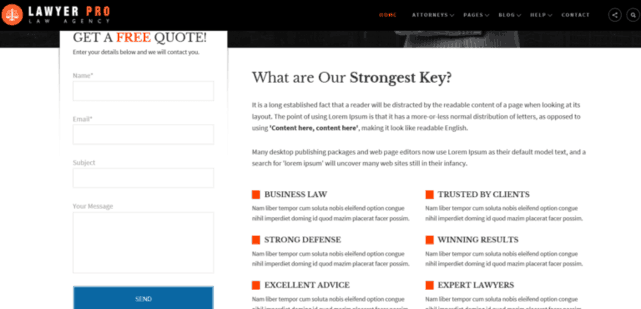
You can customize this theme using the theme customizer tool and see a live preview of the changes before you publish the theme live. This is perfect for not wanting to make the theme live when you still have not edited all the default widgets or demo content still visible. Here is a screenshot of the customizer being utilized in the demo.

Very Important!
Please keep in mind that you will need to have the Genesis Framework already installed on your blog. The cost of the framework is $59.95. This will get you a lifetime membership and free updates for the framework, which is an awesome deal.
If you are a developer, you know you can customize these themes on your own for your clients and add more money to your packaged deals. The Pro Plus StudioPress package is perfect for professional bloggers and developers. Check out the details below.

Need More Convincing?
There are thousands of plugins online to install on your blog, but installing all of them is impossible. One thing is for sure, you need to have a good web host or your blogging career won’t be very successful. Being on the Genesis Framework means there are custom plugins created especially for your community. Have a look at our mega list of Genesis Framework Plugins page to see which ones catch your interest.
If you are new to this whole blogging thing or looking for a little more knowledge? Take a look at our blog post on How To Start A WordPress Blog on the Genesis Framework.
Additional SEO Optimized Child Themes
To find more beautifully designed Themes that run off a different framework, have a look at Tesla Themes. Their themes come with a clean design, powerful features, and free premium support which is most important. Schema Integration included with all themes. Visit Tesla themes to learn more. There “Standard Package” is the best value.
- Recommended SEO Guide: How To Set Up The Yoast Premium SEO Plugin
- Recommended SEO Guide: The WP Meta SEO Plugin: An Alternative SEO Plugin
Reminder
Don’t know how to install a Genesis Framework theme? See our guide on How To Install A Genesis Framework Theme for a step by step guide. You do get a “Theme Settings” page in your admin dashboard with the Genesis Framework installed. The number of settings depends on the theme installed.
A preview:

Submit your reviews of this theme below or share your customized Starter Pro theme blog in the comment section.
Please share this blog post with your friends who are in search of a theme.

Leave a Reply