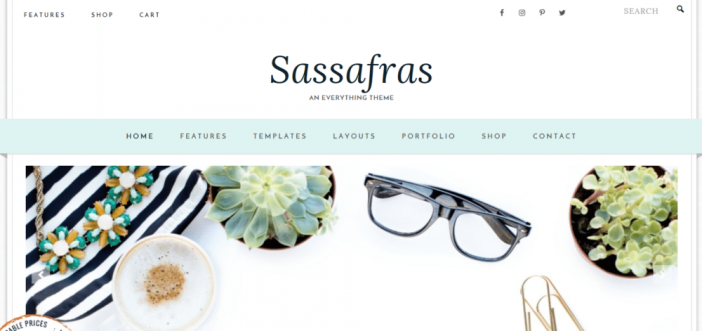
The Sassafras theme is a 3rd party Genesis Framework theme created for Feminine bloggers. This theme is coded very well and also has the ability to add a full shop to it with the suggested niche being a recipe niche. Sassafras’ homepage displays a sticky menu bar with the secondary navigation bar being the bar that is used for the sticky feature.
The primary navigation menu bar displays your social media follow buttons plus a search box and right below this bar is room to upload a logo image with a decent amount of space to fill in. Sticking with the homepage details you will have multiple widgets to configure that will help make your blog mimic the demo version’s layout. There are lots of ways to customize this theme once you own it. You can find free customization tips in our Genesis Framework Tutorials category.
Sassafras Features
- Mobile Responsive
- Retina Optimized Logo
- Portfolio Post Type
- Recipe Post Type
- Ecommerce Ready
- Sticky Navigation
- Custom Background
- Custom Colors with the Customizer
- Widgetized Custom Homepage
- Custom Archives
- Beautiful Hover Effects
- Modern & Elegant styling
Recommended Plugins
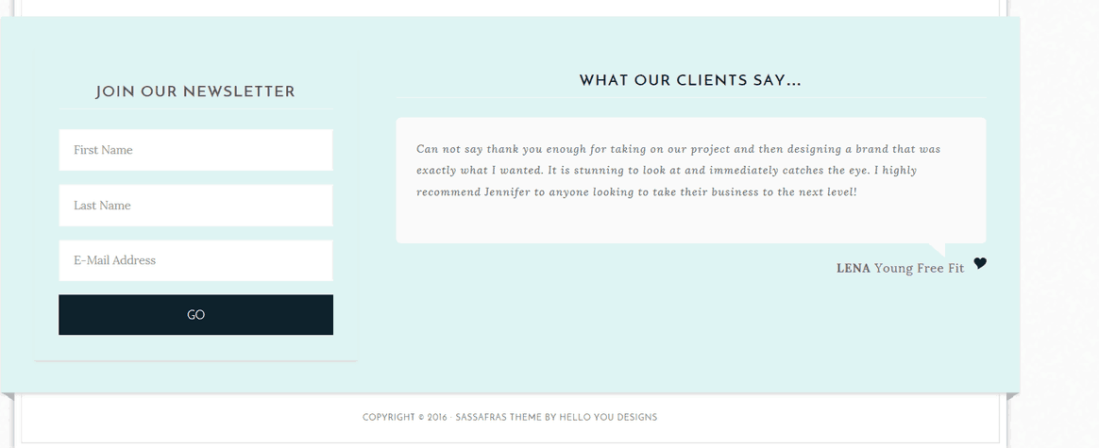
The footer widget is just totally awesome in my opinion; it displays your autoresonder box and even testimonials from people who bought products from you. Use your imagination for the footer widget section. Here is a little preview.
Here is a look at some homepage widgets.

Very Important!
Please keep in mind that you will need to have the Genesis Framework already installed on your blog. The cost of the framework is $59.95. This will get you a lifetime membership and free updates for the framework, which is an awesome deal.
If you are a developer, you know you can customize these themes on your own for your clients and add more money to your packaged deals. The Pro Plus StudioPress package is perfect for professional bloggers and developers. Check out the details below.

Need More Convincing?
There are thousands of plugins online to install on your blog, but installing all of them is impossible. One thing is for sure, you need to have a good web host or your blogging career won’t be very successful. Being on the Genesis Framework means there are custom plugins created especially for your community. Have a look at our mega list of Genesis Framework Plugins page to see which ones catch your interest.
If you are new to this whole blogging thing or looking for a little more knowledge? Take a look at our blog post on How To Start A WordPress Blog on the Genesis Framework.
Additional SEO Optimized Child Themes
To find more beautifully designed Themes that run off a different framework, have a look at Tesla Themes. Their themes come with a clean design, powerful features, and free premium support which is most important. Schema Integration included with all themes. Visit Tesla themes to learn more. There “Standard Package” is the best value.
- Recommended SEO Guide: How To Set Up The Yoast Premium SEO Plugin
- Recommended SEO Guide: The WP Meta SEO Plugin: An Alternative SEO Plugin
Reminder
Don’t know how to install a Genesis Framework theme? See our guide on How To Install A Genesis Framework Theme for a step by step guide. You do get a “Theme Settings” page in your admin dashboard with the Genesis Framework installed. The number of settings depends on the theme installed.
A preview:

Submit your reviews of this theme below or share your customized Sassafras theme blog in the comment section.
Please share this blog post with your friends who are in search of a theme.

Leave a Reply