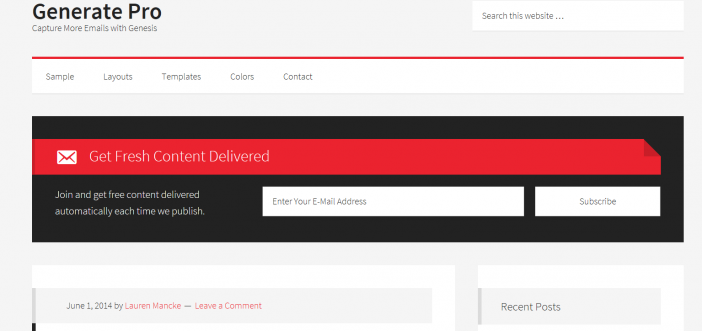
The Generate Pro theme is a Genesis Framework Theme built for bloggers in the latest news/marketing industry. This is a minimalistic design with a focus on the content as well as gaining email subscribers. Email marketing can really help make a business or blog successful if done right.
Generate Pro showcases an autoresponder box under the secondary navigation bar, which is a prime location to collect email address. You can even use this widget in the provided sidebar. Though this theme is simple, it could be the perfect option for you. You can display the autoresponder box at the end of each blog post or even stick AdSense in that location. Get creative with this theme. Consider it a blank canvas and make this them your own.
Get free help on customizing the theme files with the official StudioPress community forum. This theme is no frills, which allows you to execute your own ideas and create a blog that suits your standards. For customization idea’s or tips, have a look in our Genesis Tutorials category.
Let’s skip to the notable theme features.
Generate Pro Features
- 4 color styles
- footer widgets
- 3 layout options
- mobile responsive
- Featured images
- threaded comments
- layout options
Recommended Plugins
- Simple Social Icons
- Genesis – eNews Extended Widget
On the blog pages, you can add the eNews Extended plugin to collect email addresses and I love the built in author resource box that displays under it. Here is the screenshot of this.

This theme is built for email marketing and besides the autoresponder box on the homepage, under each blog post you can display this widget to help build up your least. Here is a preview.

Don’t forget to check out our plugins page for more awesome add-ons to really make your blog stand out.
Very Important!
This theme includes the Genesis Framework if you do not have it already installed. Theme cost is $99.95. Returning customers get discounts. Log in to your account and view the theme details page.
If you are a developer, you know you can customize these themes on your own for your clients and add more money to your packaged deals. The Pro Plus StudioPress package is the best deal for you.

Need More Convincing?
There are thousands of plugins online to install on your blog but installing all of them is not a feasible thing to do. One thing is for sure is that you need to have a good web host or your blogging career won’t be very successful. Being on the Genesis Framework means there are custom plugins created especially for our community. Have a look at our mega list of Genesis Framework Plugins page to see which ones catch your interest.
If you are new to this whole blogging thing or looking for a little more knowledge? Take a look at our blog post on How To Start A WordPress Blog on the Genesis Framework.
Theme Setup
It’s easy to get this theme up and rolling without hiring any outside help. This tutorial is broken down into step by step segments for even novice bloggers.

Additional SEO Optimized Child Themes
To find more beautifully designed Themes that run off a different framework, have a look at Tesla Themes. Their themes come with a clean design, powerful features, and free premium support which is most important. Schema Integration included with all themes. Visit Tesla themes to learn more. There “Standard Package” is the best value.
- Recommended SEO Guide: How To Set Up The Yoast Premium SEO Plugin
- Recommended SEO Guide: The WP Meta SEO Plugin: An Alternative SEO Plugin
Reminder
Don’t know how to install a Genesis Framework theme? See our guide on How To Install A Genesis Framework Theme for a step by step guide. You do get a “Theme Settings” page in your admin dashboard with the Genesis Framework installed. The amount of settings depends on the theme installed.
A preview:

Submit your reviews of this theme below or share your customized Generate Pro Theme blog in the comment section.
Please share this blog post with your friends who are in search of a theme.

thanks for sharing