
When it comes to maintaining a blog, plugins are always at the forefront. I have listed the exact plugins that WPOutcast is currently running but that list is ever-changing. Here at WPoutcast, we love testing plugins. It’s the only way to know how the plugin functions and if it’s something that will benefit our site. I have been a member on Elegant Themes for 2 years now and love it. They have a ton of premium themes to choose from, but I actually joined because of some of the plugins they have available. Below we are going to talk about our two favorite Elegant Theme’s Plugins!
If you have not looked into any of the premium Elegant Theme’s plugins, here is a glimpse of what you can do through their features and settings panel. They also have a support forum with paid staff, but I haven’t had any issues, so I have yet to create a thread.
Let’s get to the 2 Elegant Theme’s Plugins that are a must have for any blog
1. Bloom

The Bloom plugin is a cheaper alternative to the popular Optin Monster plugin. Optin Monster does provide more features, however, it will cost you a lot more than a 1-year membership to Elegant themes, where you can get all of the plugins listed on this post.
I have already blogged about how to set up the Bloom plugin, showcasing how easy it is to use. In fact, you can create a popup form or other forms (see the end of blog post for another example form) in 5 minutes or less. All you need an account with is a paid autoresponder service to connect Bloom to your email lists. Check out the bloom guide below if you have a moment.
Love the easy stat checker: (I created all new forms recently so the stats reset)
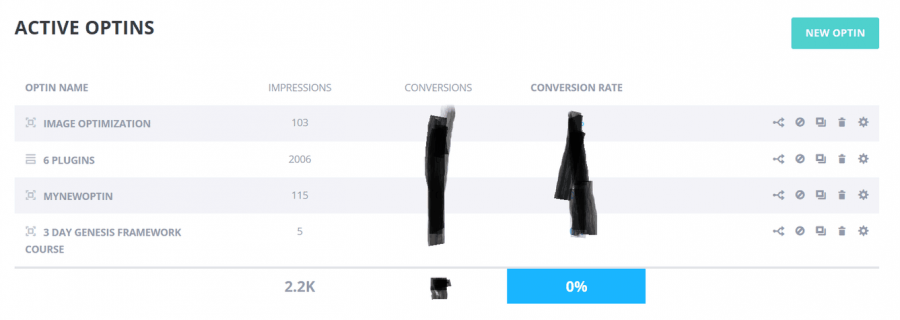
Watch the video below for more information. This plugin I use daily and is worth it.
2. Monarch Social Plugin

The Monarch plugin is what we previously used on this blog, but have since moved to another one because of its social media layout settings. Although, I am tempted to go back to this plugin because it is so good. I wrote a tutorial on how to add social media icons, using this plugin, into a widget which is a fast process to achieve.
You can add social media sharing buttons and have a lot of choices if you belong to a lot of social media websites. Do check out the video below for a more in-depth visual. If you have any questions, just ask me.

Visit the Monarch homepage for even more information.
Which plugin are you going to use?
Both of these plugins are essential for any blog. With Monarch, you also get other plugins and themes with the membership. Email marketing is very important and the Bloom plugin is worth the price, over their competitor.
Do you have any questions about the Elegant Theme’s plugins for me? Feel free to ask them in the comments section below.
Our current sharing plugin:
Don’t forget to share this blog post online. Sharing is caring.

Leave a Reply